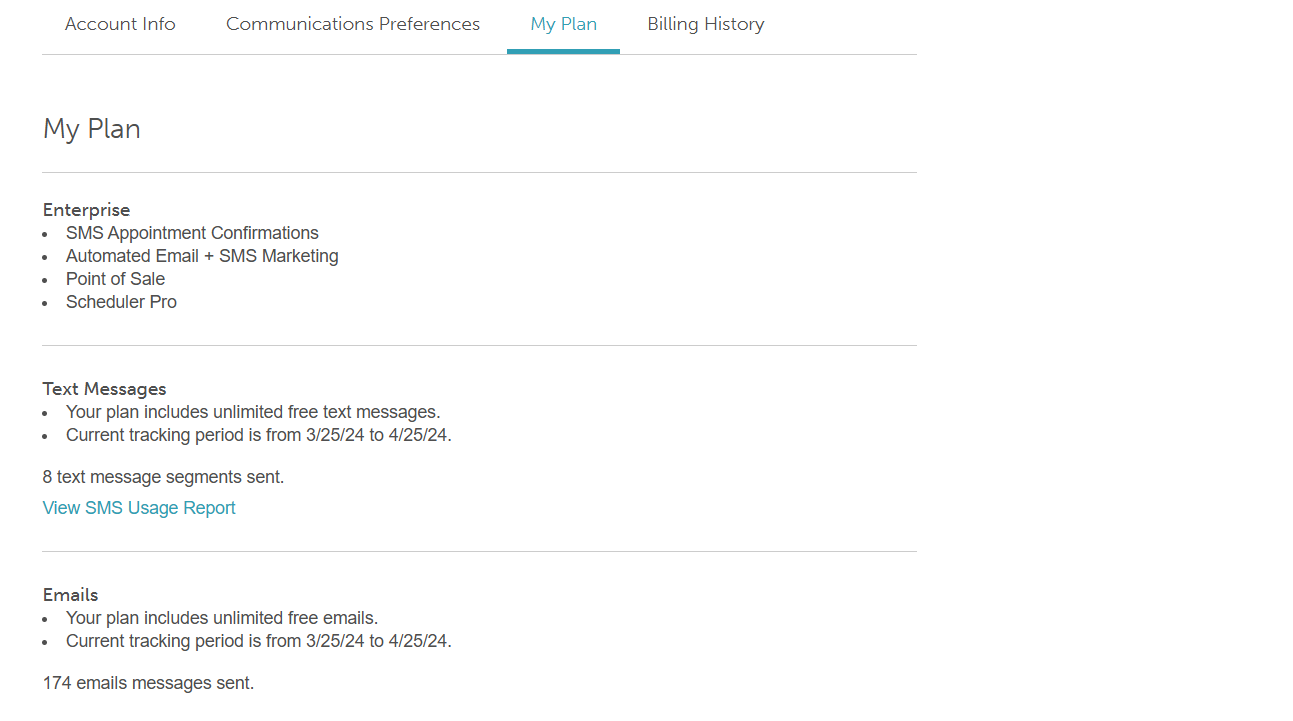
The My Plan page is your central hub for managing your MyTime subscription, providing a clear overview of your current plan tier, real-time messaging usage, and direct access to detailed performance reports.
Things to know:
- MyTime offers four subscription tiers designed to support businesses of different sizes and operational needs:
- Essential: Best for independent professionals or small businesses who need to manage core appointments and client relationships.
- Complete: Best for small businesses requiring an integrated Point of Sale (POS), credit card processing, inventory management, promotions, and staff compensation tools.
- Premier: Best for growing businesses looking to accelerate growth and scale operations using advanced AI and marketing automation.
- Enterprise: Best for franchisors, enterprise networks, and corporate groups requiring centralized governance, brand-level control, and visibility across every center.
- All subscription fees and overage charges are billed in US Dollars (USD).
- You can choose between two billing options:
- Monthly Billing: Higher monthly cost
- Annual Billing: A single upfront payment for the year
- You can store both a credit card and a bank account on file
- One payment method must be designated as the primary method. The system will not automatically attempt a secondary payment method if the primary method fails.
- Credit Cards: A 3% convenience fee applies to subscription payments and SMS/email overages (does not apply to hardware or POS processing).
- ACH (Bank Transfer): Available for US merchants to avoid the 3% surcharge. Note: Activation can take up to 7 business days.
- Franchise Subscription Management
- Whether the franchisor (parent) or the franchisee (child) pays is determined when the child account is initially created at the parent level.
- Parent-Paid Accounts: If the parent account is responsible for the subscription, payment details must be updated on the Parent Profile.
- Child-Paid Accounts: If a specific location pays its own subscription, payment details must be updated directly on that Child Account.
- Only the Account Owner has the authority to add or update payment methods, regardless of the billing structure.
- Grace Period & Suspensions
- Immediate Alert: You will receive an email notification the moment a payment attempt fails.
- 7-Day Grace Period: MyTime will automatically retry the charge daily for 7 days before suspending the account.
- Post-Suspension: If unpaid after 7 days, retries move to a monthly schedule.
- Reactivation: Updating your payment method triggers an immediate retry and processes any outstanding balance to restore service.
To view your subscription within MyTime:
- Log in to your MyTime account
- Click the drop-down arrow next to your name in the upper-right corner
- Navigate to My Account > My Plan

- Once on the My Plan page, you can perform the following actions:
- View Subscription Details: See the specifics of your current MyTime plan.
- Track Messaging Usage: Track Messaging Usage: Monitor your real-time email and SMS volume for the current billing cycle, with a direct link to the SMS Usage Report to view a detailed breakdown of message segments and their sources for any specified date range.
- Track Email Usage: Monitor how many email is included in your plan and view a real-time count of total messages sent during your current billing cycle.
For more information, contact us at support@mytime.com or (385) 233-6964.
Related Articles:
Was this article helpful?
That’s Great!
Thank you for your feedback
Sorry! We couldn't be helpful
Thank you for your feedback
Feedback sent
We appreciate your effort and will try to fix the article