MyTime offers advanced access control settings, allowing you to manage what your staff members and franchisee locations can view and access through their individual accounts. This article explains how to configure access permissions at the parent level for parent-level staff members and child account owners.
Things to know:
- Only the parent account owner can manage access permissions at the parent level
- The first step in managing your parent staff members' account access is to assign them to the appropriate roles. Once categorized, you can customize access for each role using the Access Control Settings. Each role comes with its own set of permissions. Learn more about roles here.
- Staff members should refresh whenever new permissions are assigned.
- Access permissions for franchisees (location owners) are determined at the franchisor (parent) level and cannot be overridden to grant higher permissions by the franchisee. For example, if the franchisor sets access for franchise owners to view inventory but not edit it, the franchise owner will only have view access. They can only set permissions for their staff members to either view or block access to inventory. Any child account with access control set to 'edit' will automatically be updated to 'view' to align with the parent-level permissions.
Access controls established by the parent company apply to all child company location owners
- For franchise businesses, the permission level selected at the parent level acts as the maximum ceiling for the child level. A child account can keep the parent’s permission level or restrict it further but can never select a higher permission level.
- Parent set to Block: Child account is locked to Block (no option to change to View or Edit).
- Parent set to View: Child account can choose View or Block (no option to change to Edit).
- Parent set to Edit: Child account can choose Edit, View, or Block.
- When a staff member’s access permissions are modified while they are logged in, restricted actions are blocked immediately. Attempting a restricted action will trigger the error: "Unable to perform action at this location." To apply updated permissions and avoid errors, the staff member should refresh their browser page or log out and log back in.
Contents:
- Configuring Global Access Controls For Parent Staff Members
- Configuring Global Access Controls For Child Account Owners
- Parent-Level Access Control Effects on Franchisee Level
Configuring Global Access Controls For Parent Staff Members
To give your parent staff permission to use various features of the software:
- Navigate to Business Setup > Access Controls
- Select a role in the second drop-down menu at the top right
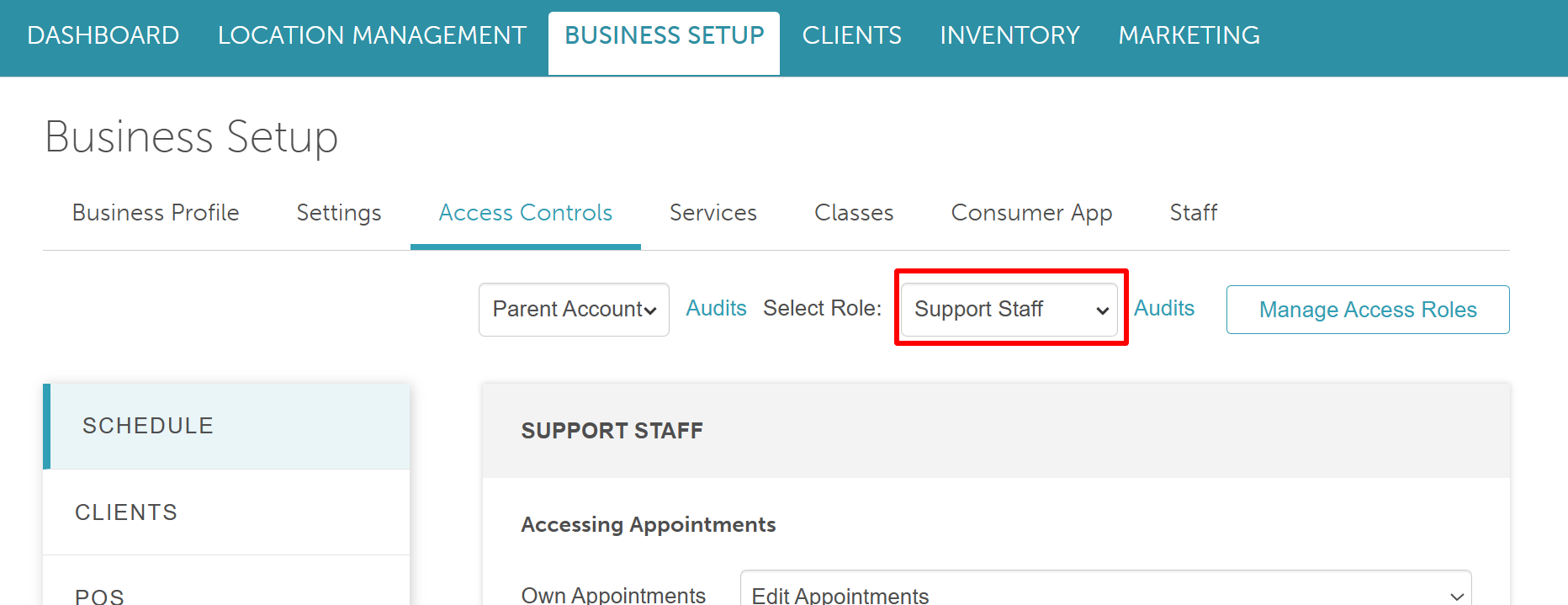
- In the left panel, select a permission category to view and enable specific permissions

Configuring Global Access Controls For Child Account Owners
To give your child account owners permission to use various features of the software:
- Navigate to Business Setup > Access Controls
- Select 'Child Account' from the first drop-down menu. This will automatically prefill the 'Child Account Owner' role in the second drop-down menu at the top right
- In the left panel, select a permission category to view and enable specific permissions

Many of the access controls are categorized by:
- Own Location
- Their Location
- All Locations
Parent-Level Access Control Effects on Franchisee Level
There are access controls that determine whether information is shared across all franchise locations, as well as those that only impact changes within individual child accounts. The table below outlines and explains the access controls that govern data sharing between franchise locations.
| Access Control | Effects at the Franchisee Level |
| Accessing Client Records | Accessing Client Record - View Their Locations Franchise locations can view client records associated with their own location through the Clients tab. They can also see clients from other franchise locations only if the client has never had an appointment at those other locations. If a client has booked at another franchise location, their record will not appear in the Clients tab. Examples:
Accessing Client Record - View All Locations Franchise locations with this access level can view all client records across all franchise locations, whether or not the client has had appointments elsewhere. Examples:
Accessing Client Record - Edit Their Locations Franchise locations can view and edit client records associated with their own location from the Clients tab. They may see clients from other locations (if those clients never booked there), but cannot edit them. Examples:
Accessing Client Record - Edit All Locations Franchise locations with this access level can view and edit client records across all franchise locations, regardless of where the client was created or booked. Examples:
|
| Accessing Client Contact Details | Accessing Client Contact Details - View Their Locations Franchise locations can view contact details only for clients associated with their own location. Accessing Client Contact Details - View All Locations Franchise locations can view contact details for clients across all franchise locations. Accessing Client Contact Details - Edit Their Locations Franchise locations can edit contact details only for clients associated with their own location. Accessing Client Contact Details - Edit All Locations Franchise locations can edit contact details for clients across all franchise locations. |
| Accessing Memberships | Accessing Memberships - View Their Locations Franchise locations can view memberships for clients associated with their own location only.
Accessing Memberships - View All Locations Franchise locations can view memberships for clients across all locations. Accessing Memberships - Edit Their Locations Franchise locations can edit memberships only for clients associated with their own location.
Accessing Memberships - Edit All Locations Franchise locations can edit memberships for clients across any franchise location. |
| Accessing Packages | Accessing Packages - View Their Locations Franchise locations can view packages for clients associated with their own location only.
Accessing Packages - View All Locations Franchise locations can view packages for clients across all locations. Accessing Packages - Edit Their Locations Franchise locations can edit packages only for clients associated with their own location.
Accessing Packages - Edit All Locations Franchise locations can edit packages for clients across any franchise location. |
| Accessing Gift Cards | Accessing Gift Cards - View Their Locations Franchise locations can view gift cards for clients associated with their own location only.
Accessing Gift Cards - View All Locations Franchise locations can view gift cards for clients across all locations. Accessing Gift Cards - Edit Their Locations Franchise locations can edit gift cards only for clients associated with their own location.
Accessing Gift Cards - Edit All Locations Franchise locations can edit gift cards for clients across any franchise location. |
| Editing Referral Credit | Editing Referral Credit - View Their Locations Franchise locations can view referral credits for clients associated with their own location only.
Editing Referral Credit - View All Locations Franchise locations can view referral credits for clients across all locations. Editing Referral Credit - Edit Their Locations Franchise locations can edit referral credits only for clients associated with their own location.
Editing Referral Credit - Edit All Locations Franchise locations can edit referral credits for clients across any franchise location. |
| Accessing Loyalty Points | Accessing Loyalty Points - View Their Locations Franchise locations can view loyalty points for clients associated with their own location only.
Accessing Loyalty Points - View All Locations Franchise locations can view loyalty points for clients across all locations. Accessing Loyalty Points - Edit Their Locations Franchise locations can edit loyalty points only for clients associated with their own location.
Accessing Loyalty Points - Edit All Locations Franchise locations can edit loyalty points for clients across any franchise location. |
See the document attached outlining each permission category and what each setting means: https://docs.google.com/spreadsheets/d/19vYM6DRs-QZ4ji2awWQNhNgCYPFbSvbs70Zi0MiADpM/edit#gid=0.
For more information, contact us at support@mytime.com or (385) 233-6964.
Was this article helpful?
That’s Great!
Thank you for your feedback
Sorry! We couldn't be helpful
Thank you for your feedback
Feedback sent
We appreciate your effort and will try to fix the article